
QR Decoder
Utility app for Android
QR Decoder scans QR codes and barcodes, captures documents, recognizes text and creates QR codes. It also has tools for ID scanning and barcode inventory lists, works with PDFs, Word and Excel files, and opens ZIP, 7z and RAR archives.
What QR Decoder does
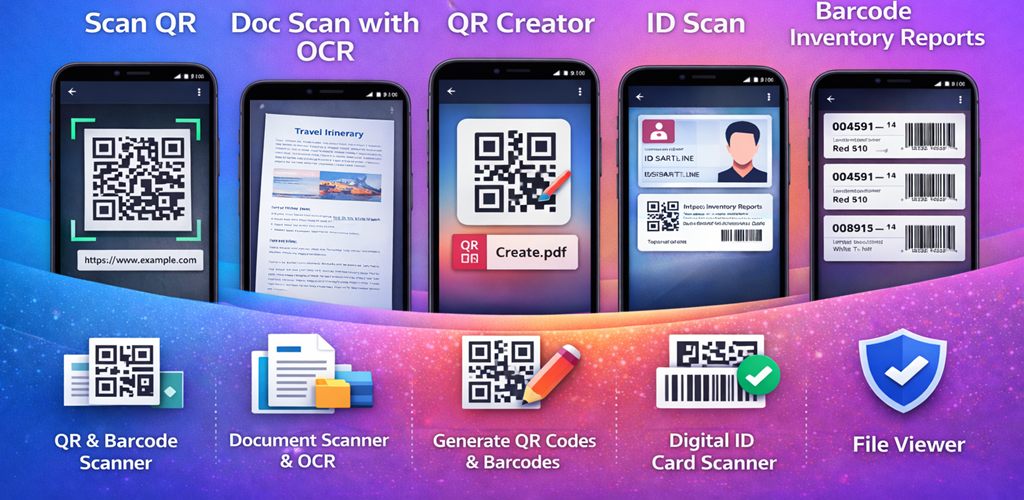
QR Decoder puts several scanning jobs in one app: reading QR codes and barcodes, scanning paper documents, recognizing text and creating QR codes.
- Category
- Utility
- Platform
- Android
- Available on
- Google Play
Tools
Four tools in one app
Scan
Read QR codes and barcodes with the camera.
Documents and text
Capture paper documents and recognize the text in them.
Create
Create your own QR codes.
IDs and inventory
Workflows for scanning IDs and keeping barcode inventory lists.
Files
PDFs, Office files and archives
These tools work on your phone. Your files stay there unless you choose to share them or save them somewhere else.
RAR archives
Open, test and extract RAR archives, including multi-part sets, password-protected archives and archives with encrypted file names. QR Decoder reads RAR files but does not create them.
More archive formats
Open Zstandard files (.zst, .tar.zst and .tzst), and 7z archives even when their file names are encrypted. Links stored inside an archive are never recreated as links on your phone.
Memory check
If a RAR or Zstandard file needs more memory than your phone can safely use, the app tells you before it unpacks anything.
Excel 97-2003 files
Edit and save .xls workbooks up to 6 MB with their formulas, cell formats, merged cells, comments and pictures. Before saving, the app lists anything an .xls file cannot keep, and you can save as .xlsx instead.
Excel tables and typing
Tables show in any of the 60 built-in Excel table styles. With a physical keyboard, Enter after a run of Tabs goes back to the column where you started.
Word documents
Documents are laid out with their own tab stops: left, center, right and decimal, with dot leaders. Set hanging indents, insert or update a table of contents, and see sizes in centimeters or inches, depending on your region.
PDF forms and signatures
Drag text fields, checkboxes and signature fields onto a page, and fill in PDF forms. The viewer shows notes, stamps and other markups added in other apps. The PDF editor shows the status of each digital signature.
Convert Lab
PDF to Word rebuilds the tables it finds as Word tables, including headers that span columns, and reads pages laid out in columns one column at a time. PDF to images keeps markups. Text in PDFs the app makes from documents, spreadsheets and text files is searchable, including words with fi and fl, such as file and flow.
Ads and data
Where ads appear
Scanning, text recognition and document processing run on the device. The app also uses network services for ads, consent, analytics and crash reports, described below and in the Privacy Policy.
Home banner
A banner may appear on the Home screen.
Full-screen ads
An occasional full-screen ad may appear when you return to Home from a tool, and when you export a PDF from the document scanner or from recognized text, after the file is created and before you save or share it.
Optional reward
A rewarded ad is optional. When you finish it, the app hides the banner and full-screen ads for 60 minutes.
Formats not used
QR Decoder does not show ads anywhere else, and it does not use App Open ads or native ads.
Third-party services
What connects over the network
Each time you open the app, Google's consent check decides whether a consent or privacy message applies in your region. Ads wait for that check, and the Analytics consent settings follow its result.
Google Mobile Ads
The app requests ads only after the consent check reports that ads may be requested.
Google UMP
The consent check runs each time you open the app. If a privacy options control is required for your location, Privacy options appears in Settings.
Firebase Analytics
Analytics collects usage data automatically. On the first launch, until the consent check finishes, the app tells Analytics that consent is denied. We add no events, user IDs or user properties of our own.
Firebase Crashlytics
Crash reporting is on in every version we publish and does not depend on the consent check. We add no custom logs, keys or user identifiers.
Resumen en español
Lo que se hace en el dispositivo y lo que usa la red
El escaneo, el reconocimiento de texto y el procesamiento de documentos se hacen en el dispositivo, pero QR Decoder también usa servicios de red para los anuncios, el consentimiento, la analítica y los informes de fallos. La Política de Privacidad lo explica.
Dónde aparecen los anuncios
Un banner en la pantalla de Inicio, un anuncio de pantalla completa ocasional al volver a Inicio desde una herramienta y al exportar un PDF desde el escáner de documentos o desde el texto reconocido, y un anuncio recompensado opcional. La App no usa anuncios App Open ni nativos.
Beneficio de 60 minutos
Cuando terminas el anuncio recompensado opcional, la App oculta el banner y los anuncios de pantalla completa durante 60 minutos.
Comprobación de consentimiento
Cada vez que abres la App, la comprobación de consentimiento de Google decide si se aplica un mensaje en tu región. La App solicita anuncios solo cuando la comprobación lo permite.
Analytics y fallos
En el primer inicio, hasta que termina la comprobación, la App le indica a Analytics que el consentimiento está denegado. Los informes de fallos están activos en todas las versiones que publicamos y no dependen de la comprobación.
Documents
Privacy, terms, notices and data deletion
The legal documents for QR Decoder, in English and Spanish.
- Privacy PolicyHow QR Decoder handles data
- Terms of ServiceThe terms for using the app
- Third-Party NoticesSoftware, services and licenses
- How to Delete Your DataDelete the data connected with the app
También en español: Política de Privacidad · Términos del Servicio · Avisos de Terceros · Cómo eliminar tus datos
Questions about QR Decoder?
Write to us with the app name, your phone model and Android version, and what happened.